How to find email from instagram: A Founder's Playbook
Discover how to find email from instagram with proven strategies, tools, and ethical outreach to build real connections.
Finding someone's email from their Instagram profile isn't just some clever hack; it's a fundamental skill for anyone serious about business development. It’s all about taking a promising connection from a noisy, public feed into a direct, professional channel where real conversations can happen.
The easiest wins are right in front of you. Always start by checking for an “Email” button on business profiles and scanning their bio for contact info or a link to a personal website.
Why Instagram Is an Untapped Goldmine for Emails
Let's get real. Trying to build serious business relationships exclusively through Instagram DMs is like trying to build a house on someone else's property. You’re at the mercy of algorithms, your important messages get buried, and you have absolutely no say when the platform decides to change the rules.
The real goal is to guide valuable connections off a public social platform and onto a channel you actually own—like email. This isn't just for convenience; it's a strategic move to take control of your outreach and build a more stable pipeline.

Shifting from Rented Space to an Owned Channel
Think of an Instagram profile as a digital storefront. It’s fantastic for grabbing attention and showing off your brand. But when it's time for a serious discussion—a partnership proposal, a sales pitch, or a request for detailed feedback—you need to bring them into the back office, away from the chaos.
Email is that private office.
For SaaS founders, making this jump is critical for a few key reasons:
- Direct Line of Communication: An email lands directly in their inbox, bypassing any social media algorithm designed to limit your reach. It's a straight shot.
- The Professional Standard: Email is the default language of business. It signals that you’re serious and allows for much more depth than a quick DM.
- Deeper Relationship Building: It’s the perfect place to nurture leads over time, keep track of conversations, and build genuine rapport without feeling intrusive.
The Problem with a DM-Only Strategy
The numbers don't lie. While Instagram has a massive audience of over 2.35 billion monthly active users, the organic reach for most business accounts has plummeted to a measly 4%.
Now, compare that to email. Email converts at a respectable 8% on average, while social media barely scrapes by at 3%. And with an ROI of 3,500% (that's $36 for every $1 you spend), getting that email address is your ticket to real, measurable growth.
When you move a conversation to email, you aren't just getting a contact detail. You're building an asset. Your email list is a direct line to your most valuable audience—one that you own, no matter what happens on social media.
This strategic shift is foundational. It ensures your hard work doesn't go to waste and that every promising contact you discover on Instagram has a real chance to become a long-term partner or customer. This process works hand-in-hand with other growth tactics, like finding the right website to promote your SaaS, to create a powerful, multi-channel outreach strategy.
Instagram DM vs Email: Which Channel Wins for Outreach?
So, when should you slide into the DMs, and when is it time to draft a professional email? Both have their place, but for serious business, email almost always comes out on top. Here's a quick breakdown of how they stack up.
| Metric | Instagram DM | |
|---|---|---|
| Formality | Casual, informal | Professional, formal |
| Reach | Limited by algorithms and privacy settings | Direct to the recipient's inbox |
| Message Length | Short, conversational, character limits | Detailed, allows for attachments |
| Tracking | Basic (seen/read receipts) | Advanced (open rates, click-throughs) |
| Ownership | Platform-controlled, "rented" audience | You own your list and the relationship |
| Best For | Quick intros, casual engagement, community building | Proposals, follow-ups, formal outreach |
While a friendly DM can be a great way to break the ice, the goal should always be to transition the conversation to email, where you can build a more lasting and valuable business relationship.
Your Best Bet? Find Emails Manually Without Ever Leaving the App
Before you even think about third-party tools or complicated software, start with the basics. The most reliable ways to find an email on Instagram are often hiding in plain sight, right within the app itself. Founders, creators, and professionals want to be contacted, so they often make their information easy to find if you know where to look.
This approach should always be your first move. It’s free, it’s fast, and it respects that the person has already chosen to share their details publicly. It’s about being a good detective, not a digital stalker.

First Things First: Look for the Contact Button
The easiest win, by far, is the dedicated contact button. Instagram business accounts—and there are over 200 million of them—can add direct contact options right on their profile.
Just go to their profile and look for the row of buttons beneath their bio. If you see an "Email" button, you've struck gold. Tapping it opens your phone's default email app with the address pre-filled and ready to go.
You’d be surprised how many people jump straight to complex methods and completely miss the email address being served up on a silver platter. Always check here first.
Next, Scan the Bio and Username for Clues
If there’s no email button, the bio is your next stop. People often get clever here to sidestep spam bots, so you need to look for a few common formats.
- Plain and Simple: Sometimes it’s just written out: "For collabs, email me at hello@startup.com."
- Spam-Proofing Tricks: Look for variations like "hello [at] startup [dot] com" or "hello(at)startup.com."
- The Emoji Hint: A classic move is the envelope emoji (✉️) followed by the address. For example: ✉️ hi@company.co
- Username Puzzles: The username itself can be a major clue. If their handle is
@johndoesmarketing, a solid first guess would be an email likejohndoesmarketing@gmail.comorjohn@theirwebsite.com.
After a while, you’ll start spotting these patterns instantly. It turns a frustrating hunt into a two-second check. This is a fundamental skill for anyone doing outreach on Instagram.
Finally, Explore the "Link in Bio"
That single "link in bio" is often a gateway to a whole lot more information. Many professionals use landing page tools like Linktree, Carrd, or Beacons to house all their important links in one place. This is prime real estate for contact info.
Click that link. Scan the page that opens for anything like "Contact," "Email Me," or "Get in Touch." The email is frequently listed on this secondary page, away from Instagram’s main interface, to better manage incoming messages.
That one extra click is often all it takes. A SaaS founder, for instance, might link to their Carrd page which has links to a product demo, their blog, and a direct email for partnership talks. They use this to keep their Instagram profile looking clean while still providing clear pathways for anyone who's serious about getting in touch. For those managing multiple accounts and channels, a social media management tools comparison can shed light on how to streamline this kind of multi-channel communication.
Using Search Engines to Uncover Hidden Contact Info
When an Instagram profile doesn't have a convenient "Email" button, it's time to take your search off-platform. This is where a little digital detective work comes in, using search engines like Google to connect the dots scattered across the internet. It’s a surprisingly effective way to track down an email when the profile itself comes up empty.
The whole strategy hinges on using the clues you do have—like a username, full name, or a linked website—to find information they’ve shared publicly somewhere else. You're not hacking into anything; you're just following a breadcrumb trail of publicly available information.
Master Advanced Search Operators
Simply Googling a username usually won't get you very far. The trick is to use advanced search operators—special commands that tell the search engine precisely what to find and where to look. This helps you cut through all the noise.
Here are a few of the search strings I lean on all the time for this:
"[username]" email: This is your first and most direct shot. The quotation marks ensure Google searches for that exact username, which is perfect for digging up mentions on personal blogs, forum profiles, or portfolio sites where they might have dropped their email.site:theirwebsite.com "contact": If their Instagram bio links to a website, this search is gold. It tells Google to only search within that specific site and look for pages with the word "contact." It's incredibly targeted."[Full Name]" + email: If you know their full name (often from their profile or a linked site), combining it with the word "email" can pull up author bios from guest articles, company staff pages, or other professional listings.
These aren't just random guesses. They are precise queries designed to zero in on publicly listed contact details. A typical search results page is a mix of ads, organic results, and other snippets, so being specific is key.
This is why targeted search terms are so crucial—they help you find exactly what you're looking for without getting lost in irrelevant results.
Triangulate Information Across Platforms
More often than not, one clue simply leads to another. The Instagram profile might not have an email, but it could link to their personal website. That website might have a link to their LinkedIn profile in the footer. And on that LinkedIn profile? That’s where you finally strike gold and find their email address.
The trick is to view their digital presence as a web. Your job is to follow the threads from one platform to the next until you land on the information you need.
I remember once trying to contact a graphic designer whose Instagram was pretty sparse. But their bio mentioned the name of the agency they worked for. A quick search for "agency name" + "[designer's first name]" email took me right to their bio on the agency’s "About Us" page, professional email and all.
The Instagram profile was just the starting point. This method turns a simple username into a key that can unlock contact details hidden in plain sight.
Choosing The Right Email Finder Tools For Scaling
Let’s be real—manual searching is a great way to get started, but it simply doesn’t scale. When you’re trying to build a pipeline for your SaaS and need to find emails from dozens, or even hundreds, of Instagram profiles, your time becomes your most valuable asset. This is the point where automated email finder tools stop being a "nice-to-have" and become an absolute necessity.
These platforms are built to do the heavy lifting for you. They automate the entire search and verification process, churning through lists of profiles in the time it would take you to find a handful of addresses manually. This frees you up to do what you do best: crafting a killer outreach message.
How Email Finder Tools Actually Work
Most of the popular email finders out there, like Hunter.io or Snov.io, work on a surprisingly straightforward principle. They crawl and scrape publicly available data from across the web, match it against common email address patterns for specific domains, and then often ping the company's mail server to see if the address is actually live.
Think of it this way: they’re essentially running the same kind of Google searches and website checks we talked about earlier, but they’re doing it on an industrial scale and at lightning speed. The really good ones pull from multiple data sources to give you the highest possible chance of getting an accurate result.
This decision guide gives you a quick visual breakdown of the whole process, showing when to stick to on-platform methods and when it's time to bring in the tools.
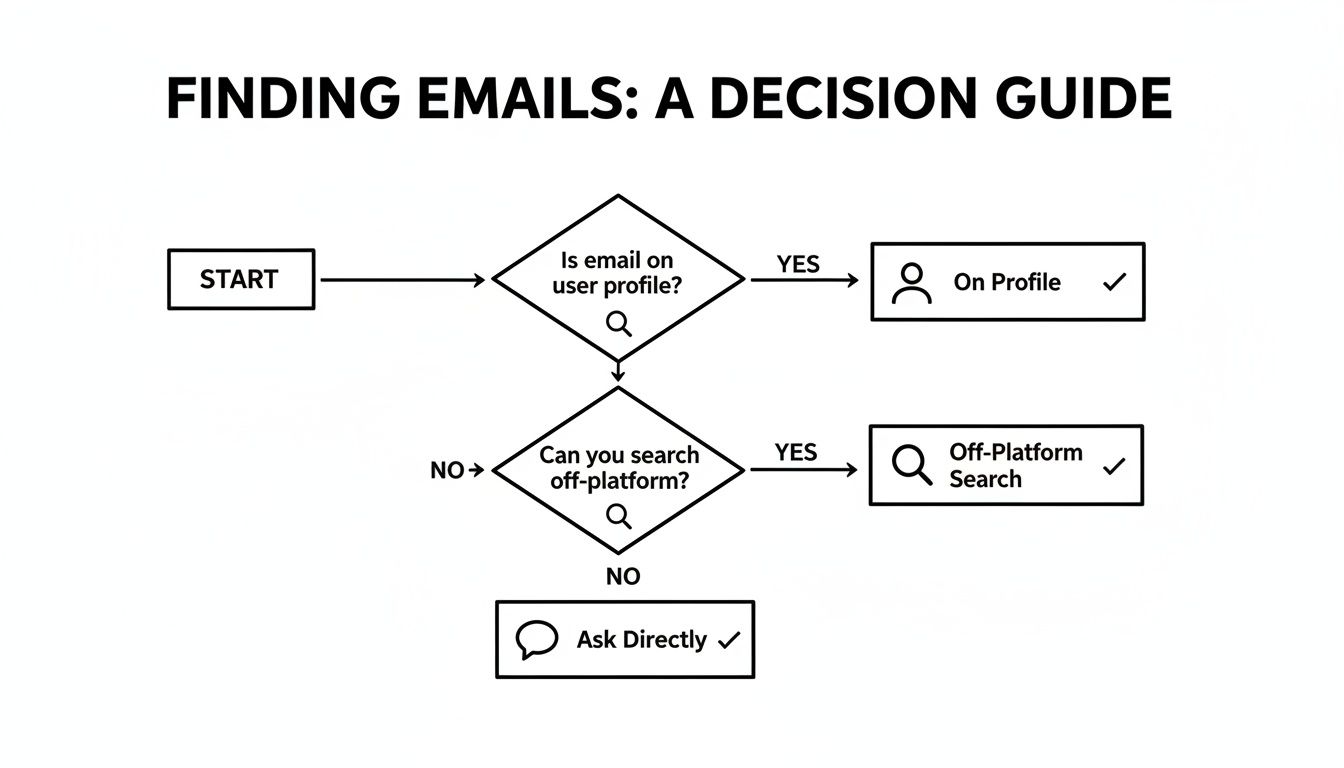
The main takeaway here? These tools are most powerful after you’ve already exhausted the low-hanging fruit on the profile itself.
A Founder's Guide to Email Finder Tools
Choosing the right tool can feel overwhelming, but it really comes down to your specific needs—are you just starting out, or are you building a high-volume outreach machine? Here’s a quick comparison to help you figure out where to start.
| Tool Name | Primary Use Case | Pricing Model | Key Feature |
|---|---|---|---|
| Hunter.io | Finding emails by company domain and name. | Credits-based subscription, with a free tier. | Chrome extension for on-the-fly lookups. |
| Snov.io | All-in-one outreach (find, verify, send). | Subscription with tiered credits and features. | Includes a simple CRM and email drip campaigns. |
| Voila Norbert | High-accuracy, single email verification. | Pay-as-you-go or subscription. | Focuses heavily on verification and accuracy. |
| Clearbit Connect | Gmail integration for instant contact info. | Free for basic Gmail use, paid for API. | Shows rich contact data directly in your inbox. |
Each of these has its place. For targeted, high-value outreach, something like Voila Norbert might be perfect. If you're building a complete outbound system from scratch, Snov.io offers a more integrated solution.
Weighing The Pros And Cons
While these tools are incredibly powerful, you need to go in with your eyes open. No tool is 100% accurate. If you blindly trust the output without any checks, you risk sending emails to dead addresses, which is a fast track to damaging your domain's sending reputation.
Here’s the good:
- Speed and Efficiency: You can process huge lists of Instagram profiles in minutes, not days.
- Bulk Processing: Upload a list of names and company websites, and get a list of potential emails back. Simple.
- Data Enrichment: Many tools go beyond just the email, pulling in job titles, company info, and other social links.
And the not-so-good:
- Cost: Those monthly subscriptions can add up, especially if you need a high volume of searches.
- Accuracy Issues: Data gets old. People change jobs. Always prioritize tools with a solid, built-in verification feature.
- Ethical Use: Remember, the goal is to find publicly available information, not to invade privacy. Use these tools responsibly.
The smartest way to use an email finder is as a verification and enrichment layer on top of your own research. It should enhance your manual efforts, not completely replace them.
For founders looking to scale up, understanding these trade-offs is key. To dig deeper into building a high-volume system, check out these methods to find business emails in bulk that blend technology with smart strategy.
Once you have that golden list of verified emails, the next challenge is getting them into a powerful outreach platform. Your choice here directly impacts deliverability and your ability to track results. Our email marketing software comparison can help you find a platform that’s the right fit for your SaaS growth stage. In the end, it all comes down to balancing your budget, the scale of your outreach, and how much you value clean, accurate data.
Crafting a DM That Actually Gets a Reply
When you've hit a wall trying every other trick to find an email, sometimes the simplest path is the best one: just ask. But hold on—this isn't a free pass to slide into someone's DMs with a generic, spammy message. The way you frame your request is everything. It’s the difference between getting a friendly response and being instantly ignored.
The secret? Lead with value, not your ask. Your first sentence needs to prove you've actually been paying attention. A lazy "love your content" is a dead giveaway you're just firing off messages to a long list of people. Get specific.

Mention a recent post, a project they just wrapped up, or something insightful they said in a Story. This small effort shows genuine interest and breaks the ice, turning a cold DM into a warm introduction.
The Anatomy of a Winning DM
A great outreach DM isn't complex, but it is thoughtful. It needs to feel personal and respect their time. I've found a simple structure that builds a bit of rapport before I even think about making my request works wonders.
Here’s a breakdown that I stick to:
- A Personal Opener: Kick things off with a genuine compliment about their recent work. Show you’ve done your homework.
- A Clear "What's In It for Them": Get to the point quickly. Why are you reaching out? Is it a collaboration? A chance for them to try something new? Make it compelling.
- The Polite Ask: This is where you smoothly transition. Explain you have more details to share that are better suited for an email.
- A Respectful Close: End by making it easy for them to say yes or no. Show them you value their time either way.
When you're reaching out, having a solid starting point helps. Using proven influencer outreach email templates can give you a great foundation, which you can then customize to make your own.
Real-World Examples That Work
Let’s get practical. Here are a couple of DMs I’ve used in the real world that consistently get positive replies. Notice how they're specific, focused on value, and super brief.
Scenario 1: Collaboration Proposal
"Hi [Name], I was really impressed with your recent post on [specific topic]. The way you explained [detail] was brilliant. I'm building a SaaS in the [niche] space and think there's a great opportunity for us to collaborate on something valuable for your audience. I've put together a brief proposal. Would you be open to me sending it over to your best email address?"
Scenario 2: Requesting Product Feedback
"Hey [Name], I've been following your work for a while and truly respect your expertise in [their industry]. We're about to launch a new tool for [solving a problem they care about], and your perspective would be invaluable. I'd love to get your quick thoughts. Could I send a short summary to your email? No strings attached."
The best DMs feel less like a transaction and more like the start of a genuine conversation. Always prioritize personalization and mutual value, and you’ll find people are surprisingly willing to share their contact information.
Navigating the Tricky Questions
Even when you follow all the right steps, trying to find an email on Instagram can feel like walking a tightrope. It's easy to wonder where the line is between diligent research and being a little too pushy. What do you do when you've exhausted every option and still come up empty-handed?
Let's tackle some of the most common questions that pop up. This is your quick guide for handling the gray areas, ensuring your outreach is both effective and, most importantly, respectful.
Is It Actually Legal to Find and Use an Email from Instagram?
This is the big one, and the answer isn't a simple yes or no. For the most part, if someone has a business profile and puts their email right there in a contact button or their bio, they’re inviting contact. Using that for a relevant, professional message is generally fine.
Where things get a bit murky is when you start using powerful tools to unearth an email that isn't publicly listed. It all comes down to your intent.
- Your Motive Matters: Are you reaching out with a genuine collaboration idea or a valuable business proposition? That’s worlds away from just scraping emails to blast out a generic marketing campaign.
- Know the Rules: Always keep regulations like GDPR in Europe and the CAN-SPAM Act in the U.S. in mind. These laws have strict rules about commercial messages, consent, and giving people an easy way to opt out.
Here's a simple rule of thumb: If you had to jump through a dozen hoops and use three different tools to find an email that was clearly not intended for the public, you probably shouldn't use it. Stick to the information people have shared willingly.
What if I've Tried Everything and Still Can't Find an Email?
It's going to happen. Some people deliberately keep their contact info under wraps, and that's a boundary you have to respect. If you’ve checked the bio, clicked the link, looked for a contact button, and even tried a few clever Google searches with no luck, it’s time to switch gears.
Your next—and really, your only—move is to send a well-crafted DM. As we talked about earlier, keep it short, polite, and focused on the value you're offering. If they don’t reply, that's your answer. Continuing to push is a surefire way to damage your reputation and come off as spammy.
No single lead is worth burning a bridge over. It’s better to accept the dead end and move on to the next opportunity.
Ready to get your SaaS in front of thousands of early adopters and tech enthusiasts? SubmitMySaas is the launchpad you need. Submit your product today and gain instant exposure, powerful backlinks, and the traction your startup deserves.