Discover the marketing automation tools comparison: Choose the best platform
A marketing automation tools comparison that helps you choose the right platform by evaluating features, pricing, and use cases.
Picking the right marketing automation tool really boils down to where your business is right now. If you're an early-stage startup, something like ActiveCampaign gives you powerful email automation without breaking the bank. As you start to scale, you might find yourself leaning towards HubSpot for its all-in-one CRM and marketing suite. For the big players at the enterprise level who need serious customization, Marketo or Customer.io are often the go-to choices for their heavy-duty, data-first capabilities.
Choosing Your SaaS Growth Engine
Let's be clear: choosing a marketing automation platform isn't just a software purchase. You're selecting the engine that’s going to drive your user acquisition, keep customers engaged, and ultimately, prevent churn. For a SaaS founder, this tool becomes the central nervous system for growth, linking every marketing touchpoint back to tangible business results. It’s a decision that forces you to look beyond shiny feature lists and get real about strategic fit.
It's no surprise the market for these platforms is exploding. The global marketing automation industry is expected to jump from USD 6.65 billion in 2024 to a staggering USD 15.58 billion by 2030. Everyone is scrambling for smarter ways to run campaigns and get analytics that actually mean something.
Aligning Your Tool with Your Business Stage
I've seen it time and again: the biggest mistake founders make is picking a tool that was built for a completely different kind of company. An early-stage startup gets bogged down in the complexity of an enterprise-grade system, while a fast-growing company hits a ceiling with a tool designed for beginners. Understanding the strategic nuances, like those in this breakdown of Account Based Marketing vs. Marketing Automation, is crucial before you commit.
This decision tree helps visualize how your goals and business stage should guide your choice.
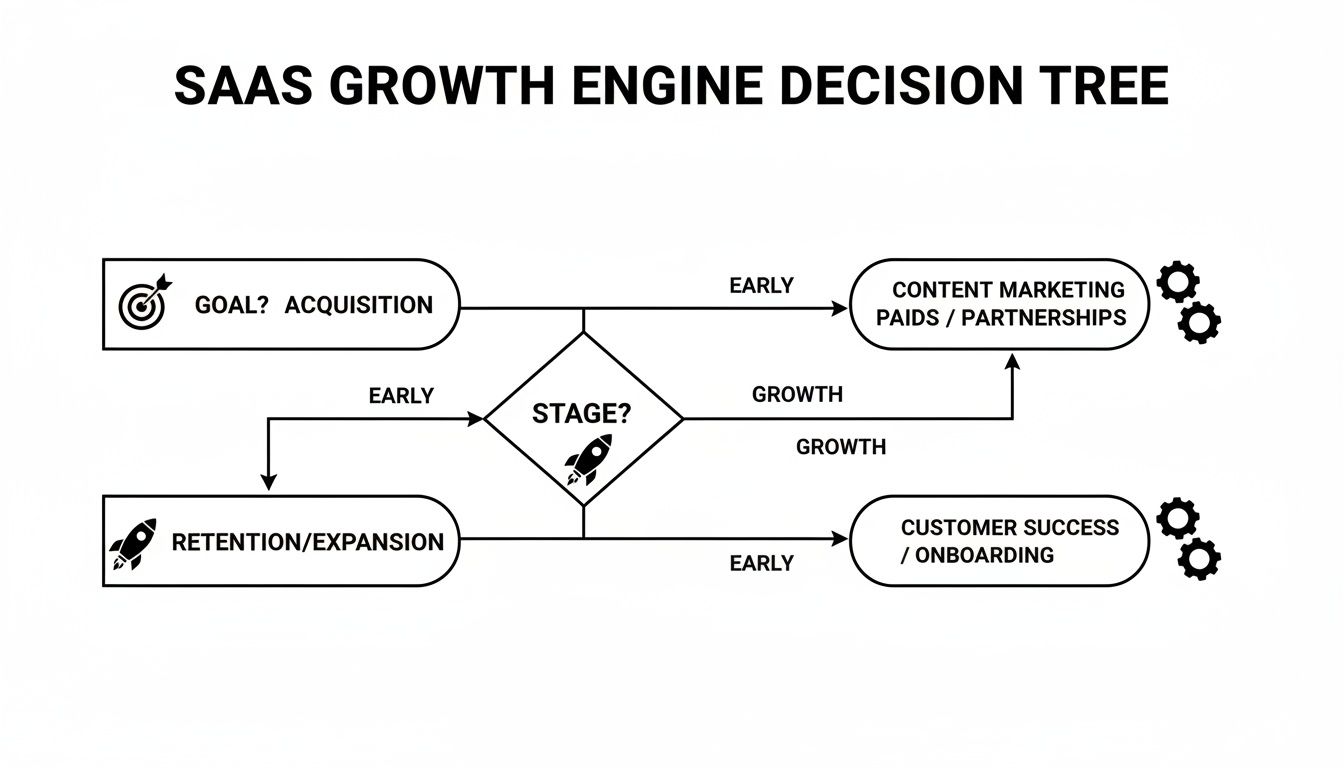
As the flowchart shows, there’s a clear line from your primary goal—whether that's acquisition, retention, or expansion—to the platform that fits your current reality. This kind of strategic alignment is a non-negotiable part of any solid SaaS product marketing strategy.
In this guide, we're putting four major players under the microscope: HubSpot, Marketo, ActiveCampaign, and Customer.io. Our comparison zeroes in on what really matters for SaaS success: scalability, how deep the integrations go, and the true cost of ownership once you're up and running.
Which Marketing Automation Tool Fits Your SaaS Stage
To make this even simpler, here's a quick reference table. It's designed to help you pinpoint the best platform based on where your SaaS is today and what you need to achieve most urgently.
| SaaS Stage | Primary Need | Best-Fit Tool | Key Strength |
|---|---|---|---|
| Early Stage (Pre-Product-Market Fit) | Lead Nurturing & Onboarding | ActiveCampaign | Powerful, affordable email automation and simple workflows. |
| Growth Stage (Scaling Users) | All-in-One Funnel Management | HubSpot | Integrated CRM, marketing, sales, and service hubs. |
| Enterprise (Complex Use Cases) | Deep Data Integration & ABM | Marketo | Robust lead scoring and enterprise-grade scalability. |
| Product-Led Growth (PLG) | Behavioral & Product-Led Messaging | Customer.io | Advanced segmentation based on in-app user actions. |
Ultimately, the "best" tool is the one that removes friction, not adds it. Use this as your starting point to match your company's DNA with the right marketing engine.
A Side-by-Side Analysis of Core Features
Let's get right to it. When you're picking a marketing automation tool, the flashy features aren't what make or break your strategy. It’s the core mechanics—the workflow builder, the segmentation engine, the email tools—that actually determine if you can turn more trials into paid users and keep churn low. Forget the marketing fluff; we’re digging into how these features actually perform for a SaaS business.
The aoption of these platforms isn't just a trend; it's a fundamental shift. A recent study found that 64% of marketers already use automation and AI in their day-to-day, with 62% calling it essential for success. This isn't slowing down. By 2026, 96% of marketing teams expect to be using these tools to refine their strategies and pinpoint their ideal customers.

Workflow and Campaign Builders
The workflow builder is the heart of any automation platform. This is where you actually map out your customer’s journey, from their first click on your site to becoming a power user. The real difference between platforms isn't if they have a builder, but how it feels to use it. Is it intuitive? Is it flexible enough for SaaS-specific scenarios?
ActiveCampaign nails the visual, drag-and-drop experience. It’s incredibly straightforward for a small team to build complex sequences. Think of a 14-day trial onboarding flow that branches based on whether a user has activated a key feature. That blend of simplicity and power makes it a go-to for early-stage SaaS companies.
HubSpot provides a similarly clean visual builder, but its superpower is the deep integration with its CRM. You can create workflows that don’t just send emails, but also trigger tasks for your sales team, update lead statuses, and create deals automatically. For instance, when a trial is about to end, a workflow can ping the account owner to make a personal call, perfectly mixing automation with a human touch.
Customer.io plays a different game, focusing almost entirely on event-based triggers that come straight from your product. Its builder is purpose-built for product-led growth (PLG) teams. You can kick off campaigns based on in-app actions like "project_created" or "invite_teammate," ensuring your messages are perfectly timed and hyper-relevant to what the user is actually doing.
Standout Feature Spotlight: Customer.io What truly sets Customer.io apart is its Liquid templating language. It lets you create incredibly dynamic and personal messages. A SaaS company can use Liquid to pull specific data right from a user's account—like the name of their last project or their current usage tier—and drop it into an email. The result is a message that feels like it was written just for them.
Segmentation and Personalization Engines
Great automation is impossible without rock-solid segmentation. Being able to slice and dice your user base based on who they are and what they do is the difference between a generic email blast and a targeted message that converts. Each platform brings a different level of sophistication to the table.
HubSpot's strength comes from its deep roots in CRM data. You can build active lists based on company size, lifecycle stage, deal information, and website activity. This is a dream for B2B SaaS companies that need to segment leads for sales handoffs or treat enterprise prospects differently from SMBs.
ActiveCampaign, on the other hand, excels at blending demographic, behavioral, and even e-commerce data. Its advanced segmentation lets you use "if/then/else" logic right inside your automations, splitting paths based on tags, custom fields, or website visits. For SaaS businesses with a wide range of user personas, this flexibility is a huge advantage.
A Look at Email Marketing Capabilities
While automation is about so much more than email, let's be honest—it's still a core channel. How these platforms handle email creation, delivery, and testing can vary quite a bit. If email is your bread and butter, it's worth diving into a more detailed email marketing software comparison to really get into the weeds.
For now, here’s a quick breakdown of how our top contenders approach email for SaaS:
| Feature | HubSpot | ActiveCampaign | Customer.io | Marketo |
|---|---|---|---|---|
| Email Editor | User-friendly, drag-and-drop with pre-built templates. | Flexible editor with great mobile optimization features. | Code-friendly editor, favors HTML/CSS for customization. | Robust but can have a steeper learning curve. |
| A/B Testing | Tests subject lines, sender names, and email content. | Advanced A/B/X split testing for up to 5 variations. | Powerful, allows testing of entire workflow paths, not just emails. | Comprehensive testing, including send time and full templates. |
| Deliverability | Strong, with dedicated IP options for high-volume senders. | High deliverability rates, known for good sender reputation. | Excellent, with tools to monitor and manage sending reputation. | Enterprise-grade deliverability and infrastructure. |
Standout Feature Spotlight: ActiveCampaign ActiveCampaign's Predictive Sending feature is a genuine game-changer for engagement. It uses machine learning to figure out the exact time each individual contact is most likely to open your emails, then automatically sends the message at that moment. It’s a simple way to boost open rates without lifting a finger.
In the end, the "best" features are the ones that perfectly match your go-to-market motion. If you're a sales-led SaaS, HubSpot’s CRM-driven workflows are a massive asset. But if you're a PLG company, Customer.io's product-based triggers are non-negotiable. This is why a granular, side-by-side look at the core engine is the most important step you can take.
Analytics and Reporting That Drive Decisions
A slick workflow builder is great, but it's only half the battle. Without clear, actionable analytics, you’re essentially just automating tasks in the dark. The real test in any marketing automation comparison is how well a platform turns raw data into strategic insights. For a SaaS founder, this means getting past vanity metrics like email opens and digging into what actually moves the needle: customer lifetime value (LTV), attribution, and funnel performance.
Good reporting isn't about spitting out endless charts; it's about answering the tough questions. Which channel brings in not just the most leads, but the most loyal, high-value users? Where are trial users bailing during onboarding? To get these answers, you need analytics that tie every marketing touchpoint directly to revenue.
Unpacking Attribution Models
Understanding how you assign credit to different marketing activities is fundamental. Platforms approach this with varying levels of sophistication, and it directly impacts where you put your marketing dollars.
First-Touch Attribution: This simple model gives 100% of the credit to the very first interaction a user has with you. It’s straightforward but can be misleading. HubSpot, for instance, makes this easy to track, which is helpful for seeing which top-of-funnel channels get the ball rolling.
Last-Touch Attribution: The polar opposite, this model credits the final touchpoint right before conversion. The reporting in ActiveCampaign often leans this way, highlighting what closes the deal. It’s valuable, but it ignores all the nurturing that came before.
Multi-Touch Attribution: This is where the real insight happens. A platform like Marketo truly excels here, offering advanced models (like W-shaped or Full-Path) that distribute credit across multiple touchpoints. You get a much more realistic picture of how all your marketing efforts work in concert to win a customer.
For any SaaS business with a long sales cycle or a complex onboarding flow, multi-touch attribution isn't a "nice-to-have"—it's a must-have for calculating ROI with any accuracy.
Custom Dashboards and Funnel Visualization
Canned reports are a fine starting point, but the ability to build custom dashboards around your specific KPIs is what separates the good platforms from the great ones. You need to see the data that matters most to your business, right when you log in.
HubSpot’s dashboard builder is famously intuitive. You can just drag and drop reports on MQLs, SQLs, and deal velocity without much fuss. It's a fantastic fit for sales-led SaaS companies that need a clear view of the pipeline from first click to final close.
Customer.io takes a different, but equally powerful, route. Its reporting is deeply woven into product events, letting you build funnels that track what users are actually doing inside your app. You can visualize the entire journey from "Signed Up" to "Activated Key Feature" to "Upgraded Plan," pinpointing exact points of friction along the way.
The Reporting Bottom Line Your goal is to connect marketing spend directly to revenue. If a platform’s reporting can’t clearly show you how a specific campaign impacted LTV or reduced churn, it’s not delivering the most critical insight you need.
Proving ROI with External Integrations
No platform exists in a vacuum. The best analytics suites play nicely with the other essential tools in your stack, especially Google Analytics and your payment processor (like Stripe).
This is where the full story comes together. By integrating with Google Analytics, for example, you can overlay your campaign data with on-site behavior. Marketo and HubSpot offer deep integrations that do just this, helping you see how a blog post led to a trial sign-up that eventually became a paying customer. This kind of cross-platform visibility is what allows you to build a confident, data-backed case for your marketing budget.
How Well Does It Play with Others? A Look at Integrations
A marketing automation platform is only as good as the company it keeps. If it doesn't plug into your existing tech stack, you've just bought yourself a very expensive, isolated data silo. You’ll create more manual work, not less, which is why a proper marketing automation tools comparison has to dig deep into how well each platform connects to the software that actually runs your SaaS.
This goes way beyond just ticking a box for "Salesforce integration." The real question is about the quality and depth of that connection. Can it handle a two-way sync for all your custom objects and fields? Or is it just a flimsy, one-way data push that someone on your team will have to babysit?
Native Marketplaces vs. API Flexibility
When you start looking at how these tools connect, you'll find two main philosophies: the plug-and-play marketplace and the build-it-yourself API. Each platform leans one way or the other, and the right fit depends entirely on your team's technical chops.
Native App Marketplaces: Platforms like HubSpot and ActiveCampaign have massive marketplaces filled with hundreds of pre-built, one-click integrations. Need to connect to Stripe, Calendly, or Slack? It’s usually a few clicks and you're done, no developer needed. The big win here is speed and simplicity.
API-First Approach: Tools like Customer.io and Marketo were built for developers. Sure, they have some native integrations, but their true power is in their robust, well-documented APIs. This is how you build deep, custom connections that can handle the unique data flowing from your own SaaS product.
Think about a real-world SaaS scenario: you want to sync product usage data from a tool like Segment to trigger behavior-based emails. With an API-first tool like Customer.io, you can send super-specific events—like feature_X_used_3_times—and immediately kick off a targeted nurture campaign. Getting that level of detail is often a real struggle with off-the-shelf marketplace apps.
A Quick Word for Founders Don't get distracted by the number of logos in an app marketplace. Pick the one integration you absolutely cannot live without—usually your CRM or product analytics tool—and test its depth. A single, rock-solid integration is worth a hundred shallow ones.
Comparing Key SaaS Integrations
For any SaaS company, a handful of integrations are simply non-negotiable. The way each platform handles these essential connections tells you a lot about where its priorities lie. Let's see how our contenders stack up with two must-have tools.
| Integration Point | HubSpot's Approach | Customer.io's Approach | ActiveCampaign's Approach |
|---|---|---|---|
| CRM (Salesforce) | A deep, bi-directional sync is one of its crown jewels, built for tight sales and marketing alignment. It handles custom objects like a champ. | It connects via its API or middleware like Zapier. It's designed for product data first, treating CRM data as a secondary (but important) source. | The native integration is strong, but it can get a bit wobbly with highly complex or custom Salesforce instances compared to enterprise-grade tools. |
| Payment (Stripe) | Its native integration is fantastic. You can easily segment contacts based on subscription status, MRR, or plan type to build churn reduction campaigns. | You'll need the API or a third-party connector. This gives you incredible flexibility to trigger messages based on very specific payment events. | It offers a solid native integration that's great for tracking revenue and segmenting customers by their purchase history. |
In the end, it really comes down to your team's DNA. If you have engineers ready to build workflows around nuanced in-app user behavior, an API-first tool is going to feel like a breath of fresh air. But if your goal is to empower a non-technical marketing team to get up and running fast with standard tools, a platform with a huge native marketplace will get you there much quicker.
Understanding Pricing Models and True ROI
It’s tempting to just look at the monthly price tag when you’re comparing marketing automation tools. But that sticker price? It's just the tip of the iceberg. The real cost of ownership is far more than the subscription fee, and hidden expenses can blow up your budget if you’re not careful.
To get a real sense of what you'll be spending, you need to get under the hood of how these platforms actually charge you. Most use a mix of models, and knowing how they work is the only way to avoid a nasty surprise on your bill six months down the line.
Decoding the Common Pricing Structures
A platform’s pricing model tells you a lot about its ideal customer. A startup just getting its footing needs predictable costs, while a product-led company with big swings in user activity might find a usage-based model makes more sense.
Here are the main flavors you’ll run into:
Contact-Based Pricing: This is the industry standard. You pay based on how many contacts are in your database. It's straightforward, which is great, but it can get pricey if you have a massive list with low engagement. You'll see this with tools like ActiveCampaign and HubSpot.
Feature-Tiered Pricing: With this model, you pay more to unlock more powerful features. The basic plan might cover simple email campaigns, but you'll need to upgrade for A/B testing, deep reporting, or predictive lead scoring. It’s a solid way to start small and scale up as your marketing gets more sophisticated.
Usage-Based Pricing: This one is more of a pay-as-you-go approach. You're charged for specific actions, like the number of emails sent or API calls made. Customer.io often leans into this, making it a natural fit for SaaS businesses that want costs to track directly with actual customer activity.
You have to think about these models in the context of your own growth. If you’re pushing a freemium product, a rigid contact-based plan could become a financial nightmare as your user base balloons. Our complete guide to SaaS pricing strategies dives much deeper into matching your pricing to your business goals.
Beyond the Subscription: Hidden Costs and Total Value
A smart evaluation goes way beyond the monthly fee to calculate the Total Cost of Ownership (TCO). There are always "hidden" costs that can pack a serious punch if you don't account for them from the start.
Don't Mistake Price for Value The cheapest tool is almost never the best investment. Think about it: a platform that costs $500/month but forces your team into 20 hours of manual workarounds is far more expensive than a $1,000/month tool that saves 40 hours and just works with your tech stack.
Keep an eye out for these potential budget-busters:
- Implementation and Onboarding Fees: Many enterprise-level platforms charge a hefty one-time fee, sometimes in the thousands, just to get you set up.
- Premium Support: Want a dedicated account manager or to jump to the front of the support queue? That’ll usually cost you extra.
- Integration Fees: Connecting to other tools might require paid connectors or, worse, developer time to build a custom solution.
- Training and Certification: Getting your team truly proficient on a complex platform like Marketo can mean shelling out for a separate training budget.
Ultimately, the goal isn't finding the cheapest tool—it's finding the one that delivers the highest Return on Investment (ROI). The data on this is crystal clear: this is an investment that pays for itself. Companies see an average return of $5.44 for every dollar spent, with many reporting 80% more leads and 77% higher conversions. Dive into these marketing automation ROI statistics if you need to build a business case.
This ROI mindset completely changes the question. It’s no longer, "How much does it cost?" but rather, "How much value will this generate for my business?"
Making the Switch Without the Headaches
Picking a new marketing automation platform feels like a huge win, but let’s be honest, the real work starts the moment you sign the contract. The migration process can make or break the entire project. I’ve seen poorly planned transitions completely tank a company's momentum, scramble years of valuable data, and leave marketing teams pulling their hair out.
Getting this right isn't about being a technical wizard. It’s about being methodical, communicating clearly, and preparing for the move before you start packing the digital boxes.
The very first thing you need to do—and it's the step everyone wants to skip—is a full data audit and cleanup. Before you even dream of exporting a single contact, get your hands dirty and scrub your current database. Get rid of the duplicates, update old information, and say goodbye to those subscribers who haven't opened an email since last year. This isn't just about starting fresh with a clean list; it can literally save you money, especially if your new plan is priced by the contact.
Your Pre-Migration Checklist
A smooth transition comes down to a solid plan. Don't rush this part. Taking the time to work through a checklist now will save you from monumental headaches down the road.
- Audit Your Existing Assets: First, inventory everything you have running. List out all your current emails, landing pages, forms, and active automation workflows. Now’s the time to be ruthless. Decide what’s essential to rebuild, what can finally be archived, and what needs a complete redesign.
- Map Your Data Fields: This is a classic "gotcha" moment. You absolutely have to make sure every custom field and property from your old system has a new home in the next one. If
Lead_Source_Detaildoesn't map to a corresponding field, that data is gone forever. - Set Up Foundational Workflows First: Before you import a single contact, build out your most critical automations in the new tool. I always start with the essentials: the welcome series for new sign-ups and a basic lead nurturing sequence. Test them thoroughly.
A new platform is the perfect excuse to simplify. You don’t have to bring every single one of your old, dusty workflows with you. Focus on rebuilding the 20% of automations that are driving 80% of your results and let the rest go.
Executing the Migration and Training
Once your prep is squared away, don't just flip the switch all at once. Start the migration in phases. I recommend moving a small, low-risk segment of your contacts first. This is your pilot group. It lets you test the data transfer and see your new workflows in action with real people. Watch the engagement and deliverability metrics like a hawk before you move on to bigger batches.
Finally, and this is non-negotiable, invest in team training. A powerful new tool is useless if nobody knows how to drive it. Schedule dedicated sessions with your platform's support team or have your team go through their official certification programs. The single best way to see a return on your investment is to empower the people who will be using the system every single day.
Frequently Asked Questions

Choosing the right marketing automation tool can feel like a make-or-break decision. To cut through the noise, I’ve answered a few of the most common questions SaaS founders ask when they get to this stage.
How Do I Know When My SaaS Is Ready For Marketing Automation?
You're probably ready when your manual follow-up process starts to crack under the pressure. The tell-tale signs are usually a consistent flow of new leads—say, 100+ new leads per month—or when you realize you need to segment users based on their in-app behavior to keep them from churning.
Ultimately, it’s less about your company's size and more about the complexity of your processes. If you can no longer scale your communication without losing that personal touch, it’s time to invest.
What Is The Biggest Mistake Startups Make When Choosing A Tool?
The most common pitfall is easily overbuying. Too many founders get locked into an expensive, enterprise-level platform packed with features they won't touch for years. It's a classic case of buying for the company you want to be in five years, not the one you are today, and it just drains your resources.
My advice? Start with a tool that solves your immediate problems brilliantly, like email nurturing and basic segmentation. Just make sure it has an affordable and logical upgrade path for when you're ready. The goal is to match the tool’s power to your team’s current capacity.
The right tool removes friction from your current operations. If it creates more work than it saves in the first six months, you likely chose a platform that's a poor fit for your business stage.
Can Marketing Automation Improve My SEO Results?
While these tools don't directly boost your search engine rankings, they have a powerful indirect effect. They're essential for actually doing something with the traffic your SEO efforts bring in.
Think of it this way: SEO gets people to your front door, but marketing automation is what invites them in and shows them around. Here’s how they work together:
- Nurtures Organic Leads: It can engage visitors with targeted content based on the blog posts or pages they landed on.
- Re-engages Visitors: It brings back people who didn’t convert on their first visit by sending personalized follow-ups.
- Increases ROI: It uses website behavior to trigger relevant campaigns, turning more of your hard-won organic visitors into paying customers.
This synergy is what ensures the traffic you generate actually translates into measurable business growth, proving the real value of your content strategy.
Ready to get your SaaS tool in front of thousands of early adopters and tech enthusiasts? SubmitMySaas is the launchpad you need. Gain immediate visibility, powerful backlinks, and the momentum to kickstart your growth. Submit your SaaS today!